Nest Learning Thermostat 4th Generation Review: Worth It? (October 2026)
The Nest Learning Thermostat 4th gen reviews point to a fit for homes that want adaptive scheduling, app control and an included room sensor. Check system compatibility first, then decide whether you will use those features.
On this page (10 sections)
- What does the Nest Learning Thermostat 4th gen offer?
- How does its learning feature work?
- What can the included temperature sensor do?
- Will it work with your HVAC system and wiring?
- How does the 4th gen model handle energy-saving settings?
- How does it compare with Ecobee?
- Is the Nest Learning Thermostat 4th gen easy to use?
- What should you check before buying?
- How should you set it up and use it well?
- Is the Nest Learning Thermostat 4th gen worth choosing?
The Nest Learning Thermostat 4th gen reviews matter most to households that want a thermostat to learn their schedule, offer remote control and help manage room-to-room temperature differences. The Google Nest Learning Thermostat works with most 24V systems, but check your wiring and equipment before you choose it.
This model combines schedule learning with an included Nest Temperature Sensor (2nd gen). It can also adjust settings based on outdoor conditions, and the Google Home app lets you review proposed schedule changes before accepting them.
What does the Nest Learning Thermostat 4th gen offer?
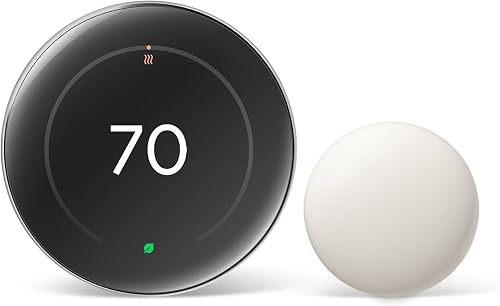
The 4th gen Nest Learning Thermostat combines adaptive scheduling, app control and room sensing in one system. It learns preferred temperatures and can adjust its schedule as your routine changes.
Google Nest Learning Thermostat: Best for changing routines
- Works with most 24V systems
- Nest Temperature Sensor (2nd gen) included
- Google Home app control
- Matter compatible
A learning thermostat for homes that want schedule adjustments, remote app control and help managing hot or cold spots with an included room sensor.
Pros
- Works with many common 24V heating and cooling systems
- No C wire required for installation in most homes
- Includes a Nest Temperature Sensor (2nd gen)
- Requests permission before schedule changes
Cons
- System compatibility still needs checking
- Some households may not need learning or room sensor features
- No C wire is not guaranteed for every home
One useful detail is that schedule changes are not silently applied without your involvement. The thermostat can notify you in the Google Home app and ask permission, so you can review a suggested adjustment and accept it with a tap.
Google says the thermostat can help save up to 31% on heating and cooling bills. Treat that as a possible outcome, not a promised bill reduction, because weather, home insulation, equipment and household habits all affect energy use.
Who should consider the 4th gen Nest Learning Thermostat?
Consider it if your home follows a changing routine, you want to adjust temperatures remotely, or you have a room that regularly feels warmer or cooler than the thermostat area. The included sensor lets you choose a room and set the temperature it should reach at a certain time.
It may be too much thermostat if you prefer to manage a fixed schedule yourself or rarely use app controls. For a simpler option, compare the Google Nest Thermostat review with the Learning model before buying.
How does its learning feature work?
The Nest Learning Thermostat can learn preferred temperatures and adjust its schedule as your routine changes. You still control the settings, and app notifications let you review proposed changes.
It also considers how outdoor temperature affects indoor conditions. For example, when sunlight through windows warms the home naturally, the thermostat can pause heating or cooling to help save energy.
If you want a broader explanation of how this category works, read what a smart thermostat learning mode does. The guide to adaptive learning thermostats can also help you decide whether schedule automation matches your habits.
Learning works best when the thermostat can recognize a routine worth adapting to. If your household has very different schedules from one week to the next, review app suggestions rather than assuming every adjustment will suit everyone.
What can the included temperature sensor do?
The included Nest Temperature Sensor (2nd gen) lets you focus temperature control on a particular room at a particular time. Place it in a room that tends to run hot or cold, then use the Google Home app to set the temperature it should reach at a selected time.
This is helpful when the thermostat's location does not reflect the comfort of a bedroom or another room you use regularly. The sensor can guide temperature control, but it does not increase your heating or cooling system's capacity.
Choose a room where the reading will help guide a real decision. A sensor in a seldom-used space adds little if you never want that room to influence the schedule.
For more on placement, see where to place remote temperature sensors. Keep a sensor away from direct sunlight, drafts and heat-producing appliances so the room reading is more representative.
Will it work with your HVAC system and wiring?
The Nest Learning Thermostat works with most 24V heating and cooling systems, including gas, electric, oil, forced air, heat pump and radiant systems. Compatibility still depends on the specific equipment and wiring in your home.
Check the Nest Compatibility Checker before buying. If you are unsure which wires you have, label them before removing the old thermostat and compare the setup with this smart thermostat wiring guide.
A C wire is not required in most homes, but some setups need one. Do not assume that the general compatibility statement guarantees your system will work; ask a qualified HVAC professional to confirm any unfamiliar wiring or system configuration.
This thermostat is for compatible low-voltage systems. If you have electric baseboard heat or another high-voltage setup, confirm the system type before considering a smart thermostat.
The Nest Thermostat vs Nest Learning Thermostat comparison can help you decide between those two models once compatibility is clear.
How does the 4th gen model handle energy-saving settings?
The 4th gen Nest Learning Thermostat includes Adaptive Eco and natural heating and cooling features. Adaptive Eco uses outdoor temperature to help choose an energy-saving temperature while you're away, then aims to return to a comfortable temperature within an hour of your return.
The natural heating and cooling feature accounts for outdoor conditions that affect indoor temperature. When sunlight warms the home, for example, it can pause the system instead of continuing to heat or cool.
These features can help manage energy use, but they cannot guarantee a certain bill reduction. Home insulation, equipment condition, weather and temperature preferences all affect the result.
Before relying on automatic settings, decide how much control you want while away. Review the app's settings and notifications, and use a temperature schedule that still protects comfort when your plans change.
How does it compare with Ecobee?
The Nest Learning Thermostat is a strong fit if learning schedules and the included Nest sensor are central to your decision. Ecobee may suit you better if its controls and features match your home and smart home setup.
See the ecobee Premium vs Enhanced comparison to compare those options.
Compare compatibility first, then look at the controls you'll use every day. Read the Ecobee Smart Thermostat Enhanced review to weigh another option in this category, and see how Nest and Ecobee thermostats differ for a wider brand comparison.
Nest supports Matter and voice control with Alexa, Siri or a Google Assistant smart speaker. Choose based on the services you already use, rather than adding a platform you do not plan to control.
Is the Nest Learning Thermostat 4th gen easy to use?
You can control it in the Google Home app, use supported voice assistants or operate its touchscreen. The display is 60% larger than the previous generation, and Dynamic Farsight helps show information from across the room.
You can choose a display design such as a clock or the weather. The thermostat adjusts brightness automatically, and you can also change it manually.
During setup, take time to choose the right display and confirm that app and voice controls work as expected. If you mainly use the wall control, make sure the screen is readable from where you normally approach it.
What should you check before buying?
Confirm compatibility and decide whether the included sensor and learning features fit your home. Those two checks will tell you whether this model's added controls solve a problem you actually have.
- Identify your HVAC system and wiring, then check them with Google's compatibility tool.
- Decide which room, if any, should guide temperature at specific times.
- Check whether you plan to use Matter or voice control with Alexa, Siri or Google Assistant.
- Consider whether you want app notifications before schedule changes.
- Arrange installation help if your wiring is unfamiliar or your setup needs a C wire.
A common mistake is buying based on the no-C-wire feature alone. That applies to most homes, not every home, so verify your exact system before ordering.
Another mistake is expecting a single sensor to fix a large comfort problem. A sensor can change which room guides temperature at a certain time, but it cannot correct poor airflow, an undersized system or a major insulation issue.
How should you set it up and use it well?
A careful setup starts with system compatibility and ends with a schedule that reflects your household. Give the thermostat time to learn your preferences, but review its suggestions as they arrive.
Before installation, record the existing wiring and label each wire. Follow the installation guidance for your exact system, then connect the thermostat to the Google Home app and confirm that the heating or cooling responds correctly to a small setting change.
Place the included sensor in a regularly used room that does not match the thermostat's reading. Avoid spots beside windows with direct sun, vents, doors or appliances that can distort the temperature.
Keep the schedule simple at first. Set comfortable temperatures for the times you are home and away, then make small adjustments instead of changing several settings at once.
That makes it easier to tell whether an adjustment helps.
Keep the thermostat's screen and sensor area clear of dust, and avoid covering the wall unit with furniture or decor. If you need to limit access to its controls, compare thermostat lock boxes.
If the display or app seems inaccurate, compare the room conditions and sensor placement before changing the schedule.
Is the Nest Learning Thermostat 4th gen worth choosing?
Choose the Nest Learning Thermostat 4th gen if you want learning schedules, remote app control and an included sensor for a room that needs separate attention. Choose a simpler thermostat if you only want a set schedule, and confirm compatibility before committing to either model.
For Honeywell model options, compare Honeywell WiFi thermostats.
For nest learning thermostat 4th gen reviews, the practical decision is whether those features will change how you manage comfort at home. If they will, this model is a focused fit; if not, compare it with the regular Nest thermostat and buy the one that matches your system and routine.
Frequently asked questions
Does the Nest Learning Thermostat 4th gen work without a C wire?
The 4th gen Nest Learning Thermostat does not require a C wire in most homes, but that is not true for every setup. Check the Nest Compatibility Checker with your current thermostat wiring and HVAC system before buying, then follow Google's installation guidance for your configuration.
What comes with the Nest Learning Thermostat 4th gen?
The package includes the thermostat display and base, a trim plate, a steel plate, mounting screws, wiring labels and a Nest Temperature Sensor (2nd gen). Use the sensor in a room that runs hot or cold, then set which temperature it should reach at a certain time in the Google Home app.
Can the Nest Learning Thermostat 4th gen control my system remotely?
You can adjust the thermostat from anywhere through the Google Home app and use voice control with Alexa, Siri or a Google Assistant smart speaker. Remote app control depends on network access, so plan to use the thermostat's local controls if your connection is unavailable.
Is the 4th gen Nest Learning Thermostat worth choosing over the regular Nest?
Choose the Learning model if you want adaptive scheduling, an included room sensor and features such as Adaptive Eco. A regular Nest may fit better if you mainly want app control and basic scheduling; compare both models' features and check HVAC compatibility before deciding.