
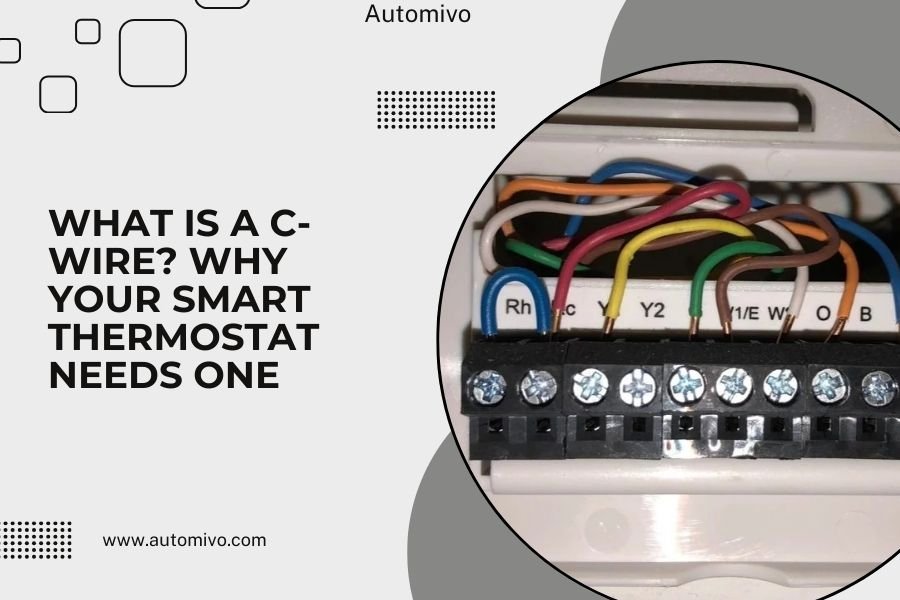
A C-wire is a common wire that provides continuous 24-volt power to your smart thermostat, allowing it to operate all its advanced features reliably.
Most smart thermostats need a C-wire because they require constant power to run Wi-Fi, touchscreens, and other modern functions that older thermostats didn’t have.
What Exactly Is a C-Wire?
The C-wire stands for “common wire.” Think of it as the return path for electricity in your thermostat system. While your thermostat gets power through other wires, the C-wire completes the electrical circuit by providing a steady path back to your HVAC system.
In simple terms, it’s like the neutral wire in your home’s electrical outlets. Your smart thermostat needs this constant connection to stay powered up 24/7.
How C-Wires Work in Your HVAC System
Your HVAC system has a low-voltage transformer that produces 24 volts of electricity. This power travels through various wires to control different functions like heating, cooling, and fan operation.
The C-wire connects directly to the common terminal on this transformer. It creates a complete electrical loop that keeps power flowing to your thermostat even when your heating or cooling isn’t running.
The Technical Side Made Simple
Picture water flowing through pipes. The hot wire brings water to your house, and the drain pipe takes it away. The C-wire is like that drain pipe – it completes the loop so water can keep flowing.
Without this return path, your smart thermostat would only get power when calling for heat or cooling. That’s not enough to run all its smart features.
Why Smart Thermostats Need Constant Power
Old mechanical thermostats were simple. They just opened and closed switches to turn your system on or off. No power needed between those moments.
Smart thermostats are mini computers. They need power for Wi-Fi connections, color displays, mobile apps, learning algorithms, and software updates.
Power-Hungry Features That Require C-Wires
- Wi-Fi connectivity for remote control
- Touchscreen displays and backlighting
- Motion sensors and occupancy detection
- Weather data and energy reports
- Voice control integration
- Automatic software updates
What Happens Without Enough Power
I’ve found that thermostats without proper power often restart randomly, lose Wi-Fi connections, or stop responding to app commands. Some even cause your HVAC system to cycle on and off unexpectedly.
Research shows that insufficient power is one of the top reasons smart thermostats fail or perform poorly (HVAC industry reports).
Does Your Home Have a C-Wire?
Many homes built after 1990 have C-wires installed, but they’re not always connected at the thermostat. Older homes often lack them entirely.
Here’s how to check if you have one available.
Quick Visual Check at Your Thermostat
Turn off power to your HVAC system first. Remove your current thermostat from the wall and look at the wires behind it.
Look for a wire connected to a terminal labeled “C” or “Common.” The wire is usually blue, but it can be any color.
What If You See Extra Wires?
Sometimes you’ll find unused wires tucked behind your thermostat. These might include a C-wire that was installed but never connected.
If you see a loose wire, check if it connects to the common terminal at your HVAC system’s control board. You might just need to connect it at the thermostat end.
Checking at Your HVAC System
Head to your furnace, air handler, or heat pump. Look for the low-voltage control board – it’s usually a small panel with several wire terminals.
Find the terminal labeled “C” or “COM.” If there’s a wire connected here, trace it back toward your thermostat area.
Common Wire Colors and Configurations
| Wire Function | Common Colors | Terminal Label |
|---|---|---|
| C-Wire (Common) | Blue, Black | C, COM |
| Heat | White | W, W1 |
| Cool | Yellow | Y, Y1 |
| Fan | Green | G |
| Power | Red | R, Rc, Rh |
What to Do If You Don’t Have a C-Wire
Don’t worry – you have several options. Some are simple DIY fixes, while others need professional help.
Option 1: Use a C-Wire Adapter
Many smart thermostat manufacturers include C-wire adapters (also called power extender kits). These clever devices work around the missing C-wire problem.
The adapter installs at your HVAC system and uses your existing wires differently. It sends power through wires that weren’t originally meant for continuous power.
How C-Wire Adapters Work
Think of it like rerouting traffic during road construction. The adapter finds alternative paths to deliver power to your thermostat using the wires you already have.
I found that most major brands like Nest, Ecobee, and Honeywell include these adapters with their thermostats.
Option 2: Run New Thermostat Cable
This is the most reliable long-term solution. A new cable gives you all the wires you need for current and future thermostats.
Modern thermostat cable typically has 8 wires, giving you plenty of options for complex HVAC systems or future upgrades.
When to Consider New Cable
- Your current cable has only 2-3 wires
- You have a complex system with multiple stages of heating/cooling
- Your existing wires are damaged or very old
- You’re planning other HVAC upgrades
Option 3: Power-Stealing Technology
Some smart thermostats can “steal” tiny amounts of power from other wires when your system isn’t running. This works for basic systems but isn’t always reliable.
Power-stealing works best with simple single-stage systems. Complex systems with heat pumps or multiple zones often need dedicated C-wires.
Limitations of Power Stealing
I’ve read that power-stealing can cause issues with some HVAC equipment. It might trigger false signals or prevent proper system shutdown (HVAC contractor associations).
If you choose this route, monitor your system carefully for unexpected behavior.
Professional vs DIY Installation
Installing a C-wire ranges from simple to complex, depending on your situation and comfort level with electrical work.
DIY-Friendly Scenarios
You might handle this yourself if you have an unused wire in your existing cable or you’re comfortable with basic electrical connections.
Using manufacturer-provided adapters is also usually DIY-friendly since they come with detailed instructions.
Safety First for DIY Work
- Always turn off power at the breaker before working
- Take photos of existing connections before disconnecting anything
- Use a multimeter to verify wires are not live
- Follow manufacturer instructions exactly
When to Call a Professional
Consider professional installation if you need to run new cable, especially through finished walls or between floors.
HVAC technicians have the right tools and experience to route cables cleanly and safely.
Complex System Considerations
Heat pumps, dual-fuel systems, and zoned HVAC systems often need professional attention. These setups have more complex wiring that’s easy to mess up.
Getting it wrong could damage expensive equipment or create safety hazards.
Cost Considerations for C-Wire Solutions
Your costs depend on which solution you choose and whether you do it yourself or hire help.
Budget-Friendly Options
Using an included C-wire adapter costs nothing extra if your thermostat came with one. DIY installation takes just an hour or two.
If you need to buy an adapter separately, expect to pay $20-50 for quality units.
Professional Installation Costs
Hiring an HVAC tech to install an adapter typically costs $100-200, including labor.
Running new thermostat cable professionally costs $150-300 for typical residential runs.
Long-Term Value
Investing in proper C-wire installation pays off through reliable thermostat operation and energy savings from smart features working correctly.
I found that properly powered smart thermostats can save 10-15% on heating and cooling costs through better scheduling and optimization (Energy Star data).
Troubleshooting Common C-Wire Issues
Sometimes C-wire problems aren’t obvious. Your thermostat might work intermittently or have strange behaviors.
Signs of C-Wire Problems
- Thermostat reboots randomly
- Wi-Fi connection drops frequently
- Display dims or goes blank unexpectedly
- Heating or cooling cycles on and off rapidly
- Mobile app shows device offline often
Quick Diagnostic Steps
Check your thermostat’s voltage using its built-in diagnostics (many smart thermostats have this feature). You should see steady 24V power.
If voltage drops below 20V or fluctuates wildly, you likely have a power supply issue.
Advanced Troubleshooting
Sometimes the C-wire connection looks right but doesn’t work properly. This can happen if wire connections are loose or corroded.
Check both ends of your C-wire connection – at the thermostat and at the HVAC control board.
When Adapters Don’t Work
C-wire adapters occasionally conflict with certain HVAC equipment. If your system behaves strangely after adapter installation, you might need a dedicated C-wire instead.
Some high-efficiency systems or variable-speed equipment can be picky about how they receive control signals.
Future-Proofing Your Thermostat Wiring
Smart home technology keeps advancing. Installing proper wiring now saves headaches later when you upgrade thermostats or add new features.
Planning for Advanced Features
Future thermostats might need additional wires for features like outdoor sensors, zone control, or integration with solar systems.
Running 8-wire cable now gives you flexibility for whatever comes next in smart HVAC technology.
Conclusion
A C-wire is the foundation that makes your smart thermostat work reliably. While it might seem like a small technical detail, having proper power delivery makes the difference between a frustrating experience and a thermostat that actually makes your life easier.
Whether you use an adapter, run new wire, or hire a professional, solving your C-wire situation is worth the effort. Your smart thermostat will work better, last longer, and deliver the energy savings and convenience you bought it for.
Don’t let a missing C-wire stop you from enjoying modern comfort control. With the right approach for your situation, you’ll have reliable smart temperature control that works exactly as promised.
Can I install a smart thermostat without a C-wire at all?
Some basic smart thermostats work without C-wires using power-stealing technology, but you’ll likely experience reliability issues and limited functionality. Most advanced features need continuous power to work properly.
Will a C-wire adapter work with any HVAC system?
C-wire adapters work with most standard residential systems, but complex setups like heat pumps, dual-fuel systems, or systems with multiple zones might need professional evaluation to ensure compatibility.
How can I tell if my existing thermostat uses a C-wire?
Check behind your current thermostat for a wire connected to a terminal labeled “C” or “Common.” The wire color varies, but blue and black are most common for C-wires in residential installations.
Is it safe to connect a C-wire myself?
Basic C-wire connections are generally safe for DIY if you turn off power first and follow instructions carefully. Running new cable through walls or working with complex HVAC systems is better left to professionals.
What happens if I connect the C-wire incorrectly?
Incorrect C-wire connections usually just prevent your thermostat from working rather than causing damage. You might blow a low-voltage fuse in your HVAC system, which is inexpensive and easy to replace.
