
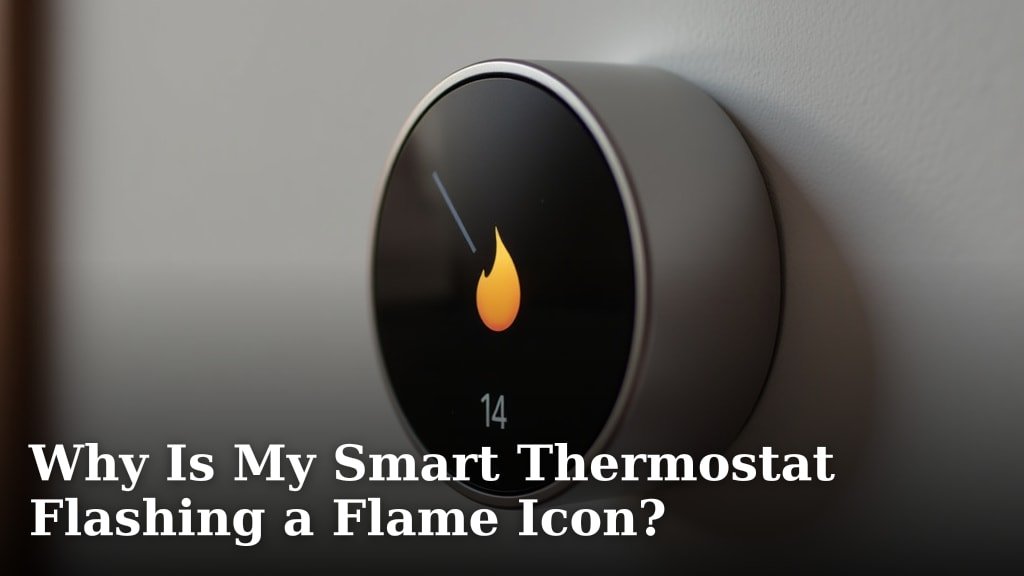
Your smart thermostat is flashing a flame icon because it is actively heating your home or is requesting heat from your furnace. This is generally a normal operational indicator, not an error. It means your heating system is working as intended to reach your desired temperature.
This little flame icon simply tells you your thermostat has turned on your furnace. It will usually disappear once your home reaches the set temperature. Sometimes, it might also flash if there’s a slight delay or issue communicating with your heating system, but this is less common.
- Flame icon means your heat is on.
- It’s usually a normal signal, not a problem.
- The icon typically goes away when your home warms up.
- Rarely, it could signal a communication hiccup.
So, should you be worried, or is your thermostat just doing its job? Let’s walk through exactly what that flame icon means and when you might need to pay closer attention.
Understanding Your Smart Thermostat’s Flame Icon
The flame icon on your smart thermostat is typically an indication that your heating system is actively engaged. It means your thermostat has sent a signal to your furnace, boiler, or heat pump to start producing warmth. Think of it as a “heat on” indicator, much like a power light on an appliance.
This little symbol confirms that your thermostat is doing its job: managing your home’s temperature. It turns the heat on when the indoor temperature drops below your set point. Then, it turns it off once that desired temperature is reached. Most of the time, seeing this flame is a good sign of normal operation.
When the Flame Icon is Normal
You’ll see the flame icon whenever your heating system needs to kick in. This is its way of saying, “I’m working to make your home cozy.” It’s part of the standard process of maintaining a comfortable indoor environment. There are a few common scenarios where this icon appears as expected.
Initial Heating Cycle
When you first adjust your thermostat to a higher temperature, or after a period of being away, your system will need to catch up. The flame icon will illuminate to show that your furnace is running to warm your home. It will stay on until your living space reaches the set temperature. This is completely normal and expected behavior.
Maintaining Temperature
Throughout the day, especially during colder months, your heating system will cycle on and off to maintain your desired temperature. Each time it turns on, you’ll see that flame icon. These cycles are usually short, meaning the icon might flash on for a few minutes, then turn off. This constant monitoring and adjustment is how your smart thermostat keeps you comfortable.
Scheduled Heating Periods
If you’ve set up a schedule for your thermostat, the flame icon will appear during those programmed heating times. For example, if you set it to warm your home before you wake up, you’ll see the flame during that morning heating period. This is the system following your instructions, which is exactly what a smart thermostat is designed to do.
When the Flame Icon Might Indicate a Minor Glitch
While usually a normal signal, sometimes a flickering or consistently on flame icon can hint at something less routine. These aren’t always major problems, but they are worth noticing. It’s like a little cough; usually nothing, but sometimes it means a cold is coming.
Communication Delays
Smart thermostats rely on good communication with your HVAC system. If there’s a brief interruption in the signal, the flame icon might flash or stay on longer than expected without heat actually being produced. This could be due to minor electrical fluctuations or a temporary network hiccup if your thermostat is Wi-Fi enabled. These usually resolve on their own, but it’s something to monitor.
Minor System Hiccups
Occasionally, your furnace might attempt to start but fail to ignite immediately. In these cases, the thermostat might keep the flame icon on as it continues to send the “heat on” signal. The system might try a few times before successfully heating or giving up. This could be a sign of a small issue with ignition or a sensor. It’s often transient, but if it happens often, it’s worth investigating.
What If the Flame Icon Stays On (But There’s No Heat)?
This is where your attention becomes more important. If you see the flame icon constantly illuminated, but you don’t feel any warm air coming from your vents, it’s a clear signal that something isn’t right. Your thermostat thinks it’s heating, but your furnace isn’t delivering. This scenario needs a closer look.
Many homeowners overlook this until their home feels chilly. The thermostat is diligently reporting that heat is on, creating a false sense of security. Always confirm actual heat output when you notice the icon lingering for too long without a temperature change.
Thermostat-to-Furnace Disconnect
One common reason for this is a wiring issue or a problem with the thermostat’s internal components. The thermostat sends the “on” command, but the signal isn’t reaching the furnace. This could be a loose wire at the thermostat itself or at the furnace control board. Sometimes, a wire might be corroded or simply broken. It’s like pressing a light switch, but the bulb doesn’t turn on. If you’re considering replacing your thermostat due to persistent wiring issues, you might be able to install a smart thermostat yourself.
Furnace Malfunction
Even if the thermostat sends the signal, your furnace might be having an issue preventing it from igniting or running. This could range from a simple clogged filter to a more serious mechanical failure. For example, a clogged air filter can restrict airflow, causing your furnace to overheat and shut down prematurely (HVAC.com).
- Clogged Air Filter: A dirty filter restricts airflow, causing your furnace to work harder and potentially overheat. This can lead to system shutdowns.
- Pilot Light/Ignition Problem: Older furnaces have a pilot light. If it’s out, the furnace won’t light. Newer furnaces use an electronic igniter, which can sometimes fail.
- Blower Motor Issues: If the fan that pushes warm air through your home isn’t working, you won’t feel heat, even if the furnace is firing.
- Safety Lockouts: Furnaces have safety features that shut them down to prevent damage or dangerous conditions, like carbon monoxide leaks.
Thermostat Settings Incorrect
Sometimes the problem is simpler: your thermostat settings might be off. Is it set to “Auto” or “Heat”? Is the temperature actually set higher than the current room temperature? Double-check that your heating schedule isn’t overriding your manual settings. We found that a surprising number of service calls could have been avoided by a quick check of the settings (HVAC industry analysis).
Troubleshooting Your Smart Thermostat and Heating System
Before calling a professional, there are several steps you can take to diagnose the problem. Think of these as your basic “first-aid” for your heating system.
| Problem Indication | What to Check First | Potential Deeper Issue |
|---|---|---|
| Flame icon on, no heat (short term) | Thermostat settings, fan setting, schedule | Communication glitch, temporary furnace lockout |
| Flame icon on, no heat (long term) | Furnace power, filter, emergency switch | Pilot light/igniter, blower motor, control board |
| Flame icon flashing rapidly | Thermostat Wi-Fi connection (if applicable) | Communication error between thermostat and furnace |
| Flame icon on, then off quickly, no heat | Thermostat battery, furnace air filter | Furnace short-cycling due to overheating or other fault |
Checklist for a Persistent Flame Icon with No Heat
If that flame icon is still glowing but your home is cold, here’s a quick checklist to follow:
- Check your thermostat settings: Is it set to “Heat”? Is the temperature setting higher than the current room temperature?
- Ensure your furnace has power: Check the breaker switch in your electrical panel. Sometimes it just needs to be reset.
- Inspect your furnace filter: A dirty, clogged filter is a common culprit for heating issues. Replace it if it’s visibly dirty.
- Look for an emergency shut-off switch: Many furnaces have a light switch on the wall nearby that looks like a regular light switch. Ensure it’s in the “On” position.
- Verify the pilot light (if applicable): If you have an older furnace, check if the pilot light is lit. Follow your furnace’s manual for relighting instructions.
- Reset your smart thermostat: Sometimes a simple reboot can clear minor glitches. Check your thermostat’s manual for proper reset procedures.
When to Call a Professional
If you’ve gone through the troubleshooting steps and the flame icon is still on with no heat, or if you suspect a more serious issue, it’s time to call in the experts. Issues like a failing igniter, a faulty blower motor, or problems with gas lines are best handled by a qualified HVAC technician. Don’t try to fix complex furnace problems yourself, as it can be dangerous and void warranties (Consumer Reports).
Conclusion
The flame icon on your smart thermostat usually means your heating system is doing its job. It’s a normal signal that your furnace is working to warm your home. Pay attention if the icon stays on but you feel no heat. This could point to a simple setting error or a more serious furnace issue. By understanding these signs, you can often troubleshoot minor problems yourself. Always remember to call a professional HVAC technician for complex repairs. Staying informed helps keep your home comfortable and your heating system running efficiently.
Frequently Asked Questions
Why does my smart thermostat show a flame but my house isn’t getting warm?
If your thermostat shows the flame icon but you’re not feeling heat, it means the thermostat is sending a call for heat, but your furnace isn’t responding. This could be due to a tripped breaker, a clogged filter, or a furnace malfunction. Check these common culprits first.
How long should the flame icon typically stay on?
The flame icon should stay on as long as your heating system is actively running. This could be a few minutes for a short cycle or longer if your home needs to warm up significantly. It should turn off once your desired temperature is reached.
Can a bad Wi-Fi connection affect the flame icon display?
Yes, a poor Wi-Fi connection can sometimes cause communication delays between your smart thermostat and your heating system. This might lead to the flame icon flashing or staying on longer than expected, even if the heat isn’t consistently active. Improving your Wi-Fi signal can help.
Is it normal for the flame icon to flicker on and off quickly?
Rapid flickering might suggest a minor communication glitch or that your furnace is attempting to ignite multiple times. While often temporary, if it happens frequently without consistent heat, it could signal an underlying issue with your system or ignition.
What’s the first thing I should do if the flame icon is on but there’s no heat?
Start by checking your thermostat settings to ensure it’s on “Heat” and the set temperature is above the current room temperature. Then, verify your furnace has power and its air filter isn’t clogged. These simple checks often resolve the issue.
