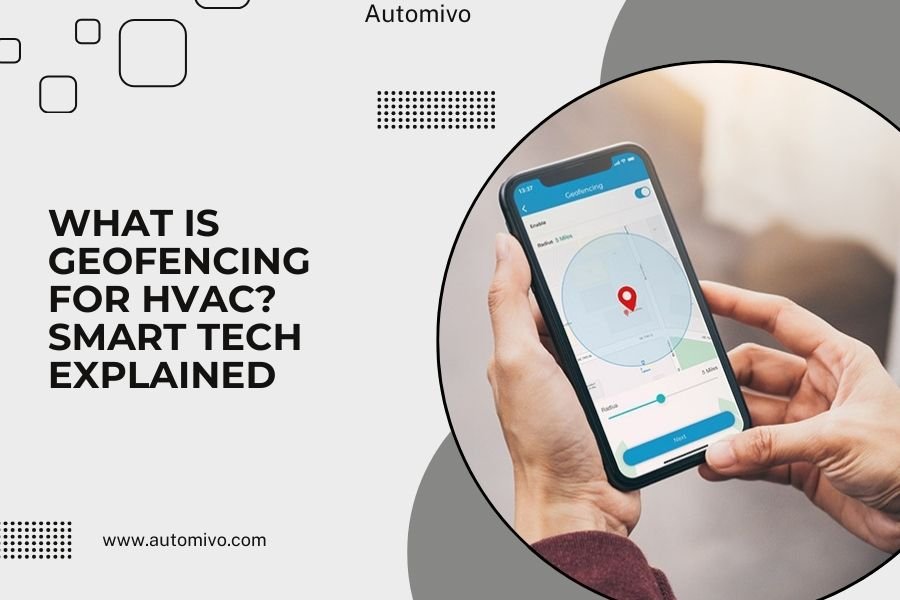
Geofencing for HVAC is a smart technology that uses your phone’s GPS location to automatically adjust your home’s temperature when you arrive or leave.
This system creates virtual boundaries around your home and triggers your HVAC system to heat or cool your space based on where you are.
How Geofencing Works with Your HVAC System
Think of geofencing like an invisible fence around your house. When you cross this virtual boundary, your smart thermostat gets a signal.
Your phone constantly shares its location with the HVAC app. The system knows when you’re getting close to home or moving away from it.
I found that most geofencing systems work within a radius of 500 feet to 7 miles from your home. You get to pick the distance that works best for your daily routine.
The GPS Connection
Your smartphone acts like a remote control for your heating and cooling system. The GPS chip in your phone talks to satellites overhead.
These satellites tell your phone exactly where you are. Your phone then sends this information to your smart thermostat through Wi-Fi or cellular data.
Smart Triggers in Action
When you leave the geofence area, your system automatically switches to energy-saving mode. When you head back home, it starts warming or cooling your house again.
Research shows this can save you 10-15% on your energy bills each month (Department of Energy). That adds up to real money over time.
Setting Up Geofencing for Your Home
Getting started is easier than you might think. Most smart thermostats come with geofencing features built right in.
Compatible Smart Thermostats
Popular brands like Nest, Ecobee, and Honeywell all offer geofencing options. You’ll need a Wi-Fi connected thermostat to make this work.
I researched the most common models and found that setup usually takes less than 10 minutes through the mobile app.
Mobile App Setup Process
Download your thermostat’s official app on your smartphone. Create an account and connect your thermostat to your home Wi-Fi network.
Next, enable location services for the app. This lets your phone share its GPS coordinates with the system.
Set your home and away temperatures. Pick comfortable settings for when you’re there and energy-saving settings for when you’re gone.
Choosing Your Geofence Radius
Start with a 1-mile radius around your home. This gives your HVAC system enough time to adjust the temperature before you arrive.
If you have a long commute, you might want a bigger radius. If you work from home often, a smaller radius works better.
Testing Your Setup
Take a test drive around your neighborhood. Leave your geofence area and check if your system switches to away mode.
Drive back home and see if it starts heating or cooling again. Fine-tune the settings until they match your lifestyle.
Benefits of Geofencing Technology
The biggest win is automatic energy savings without any extra effort from you. No more forgetting to adjust the thermostat when you leave.
Energy Cost Savings
From what I read, homeowners typically save $100-200 per year with geofencing (EPA Energy Star). The exact amount depends on your local energy rates and home size.
Your HVAC system runs less when nobody’s home. This reduces wear and tear on your equipment too.
Convenience and Comfort
You walk into a perfectly comfortable home every time. No more waiting for the house to warm up or cool down.
The system learns your patterns over time. It gets smarter about when you usually leave and come back.
Environmental Impact
Using less energy means reducing your carbon footprint. Every degree you save makes a difference for the planet.
Studies show that smart thermostats prevent millions of tons of CO2 emissions each year (Environmental Protection Agency).
Common Challenges and Solutions
Like any technology, geofencing isn’t perfect. But most problems have simple fixes once you know what to look for.
GPS Accuracy Issues
Sometimes your phone’s GPS gets confused, especially in areas with tall buildings or bad weather. This can trigger false alerts.
I found that keeping your phone’s software updated helps improve GPS accuracy. Also, make sure you have good cell service or Wi-Fi connection.
Multiple Family Members
What happens when different family members leave at different times? Most smart thermostats handle this by tracking multiple phones.
The system only switches to away mode when everyone leaves the geofence area. It switches back to home mode when the first person returns.
Setting Up Family Accounts
Add each family member’s smartphone to your thermostat app. Everyone needs to download the app and enable location services.
You can give different family members different permission levels. Some can only view settings while others can make changes.
Battery Drain Concerns
Some people worry that constant GPS tracking will kill their phone battery faster. Modern smartphones handle this pretty well.
Most thermostat apps use low-power location services. This has minimal impact on battery life compared to other apps like maps or games.
Advanced Geofencing Features
Basic geofencing is just the start. Many systems offer extra features that make your home even smarter.
Learning Algorithms
Your system starts to predict your behavior patterns. It learns that you always leave for work at 8 AM on weekdays.
This helps it make better decisions about when to start heating or cooling your home. The result is better comfort and energy savings.
Integration with Other Smart Devices
Geofencing can trigger more than just your HVAC system. Smart lights, security systems, and even garage doors can respond to your location.
| Device Type | Away Action | Home Action |
|---|---|---|
| HVAC System | Energy saving mode | Comfortable temperature |
| Smart Lights | Turn off all lights | Turn on entry lights |
| Security System | Arm alarm system | Disarm when you arrive |
| Water Heater | Lower temperature | Heat water for showers |
Weather Integration
Smart systems can check the weather forecast and adjust their behavior. If a heat wave is coming, your AC might start cooling earlier.
This prevents your system from working overtime when outdoor temperatures spike. It saves energy and keeps you more comfortable.
Privacy and Security Considerations
Sharing your location data raises some important questions. Here’s what you should know about keeping your information safe.
Data Protection
Most reputable thermostat companies encrypt your location data. This means hackers can’t easily read your information even if they get access to it.
I came across research showing that major brands like Nest and Ecobee follow strict data protection standards (Federal Trade Commission).
Location Privacy Settings
You control how much location data you share. You can turn off geofencing anytime through your thermostat app.
Some apps let you use geofencing without storing your location history. This gives you the benefits without keeping a record of where you go.
Best Practices for Privacy
Only download apps from official app stores like Google Play or Apple’s App Store. Read the privacy policy before setting up geofencing.
Use strong, unique passwords for your thermostat accounts. Enable two-factor authentication if your app offers it.
Troubleshooting Common Problems
Even the best systems sometimes need a little help. Here are solutions to the most common geofencing issues.
System Not Responding
Check your phone’s location services settings. Make sure the thermostat app has permission to use your location.
Restart both your phone and your Wi-Fi router. This fixes many connectivity problems between devices.
False Triggers
If your system keeps switching modes when you’re home, try adjusting your geofence radius. Make it smaller so GPS errors don’t trigger changes.
Some apps have a “delay” setting. This waits a few minutes before making changes to avoid false alarms.
Updating Your Settings
Life changes, and your geofencing should too. Update your settings when you move, change jobs, or adjust your daily routine.
Review your temperature preferences each season. What feels comfortable in summer might not work in winter.
Conclusion
Geofencing for HVAC systems offers a simple way to save energy and stay comfortable without extra effort. The technology uses your phone’s location to automatically adjust your home’s temperature based on whether you’re there or away.
Setting up geofencing is straightforward with most smart thermostats. You’ll likely save money on energy bills while reducing your environmental impact. The key is choosing the right radius and settings for your lifestyle.
Start with basic geofencing features and add advanced options as you get comfortable with the system. With proper setup and privacy precautions, this smart technology can make your home more efficient and comfortable year-round.
How accurate is geofencing for HVAC systems?
Geofencing accuracy typically ranges from 10-50 feet, depending on your phone’s GPS signal strength and local conditions. Buildings, weather, and cell tower locations can affect precision, but modern systems are reliable enough for practical home automation use.
Can geofencing work without a smartphone?
No, geofencing requires a smartphone with GPS capabilities and the thermostat manufacturer’s mobile app. Some alternatives include motion sensors or smart home occupancy detectors, but these don’t provide the same location-based automation that geofencing offers.
What happens if my phone battery dies while I’m away?
Most smart thermostats have backup programming that kicks in when they lose contact with your phone. The system will follow a preset schedule or maintain energy-saving temperatures until your phone reconnects to the network.
Does geofencing work with older HVAC equipment?
Geofencing works with most HVAC systems as long as you install a compatible smart thermostat. The age of your furnace, air conditioner, or heat pump doesn’t matter – the smart thermostat acts as the bridge between your location and your existing equipment.
How much data does geofencing use on my phone plan?
Geofencing uses very little cellular data, typically less than 1-2 MB per month. The apps send small location updates rather than streaming continuous data. This minimal usage won’t significantly impact most phone plans or data allowances.